Plans and subscription
Compare what each plan includes, see the plan you're on, and switch plans. This is where you subscribe, upgrade, and top up your voice-order credits.
Where to find it: open Plans in the main menu, or go to
/subscription.
Before you start
- You need to be signed in to your merchant account.
- Paying for a plan opens a secure payment page. Have a card or bank option ready.
- Your current status shows in the badge at the top right: Active · [plan], Trial · [plan], or No active plan.
Compare the plans
- Open Plans. The plans sit side by side so you can compare them.
- Choose how often you want to be billed using the toggle near the top: Monthly, Quarterly, or Yearly. Yearly shows a save 17% tag. Prices update as you switch.
- Read down each column. The rows are grouped, starting with Locations and Commission, then the features by area (for example Orders).
- A tick means the feature is included.
- A number or label (like a reporting level) means it's included at that level.
- A dash (—) means it's not in that plan.
- Your current plan is marked with a Current tag.
- On a phone, tap a plan name along the top to see that plan's full breakdown, one plan at a time.
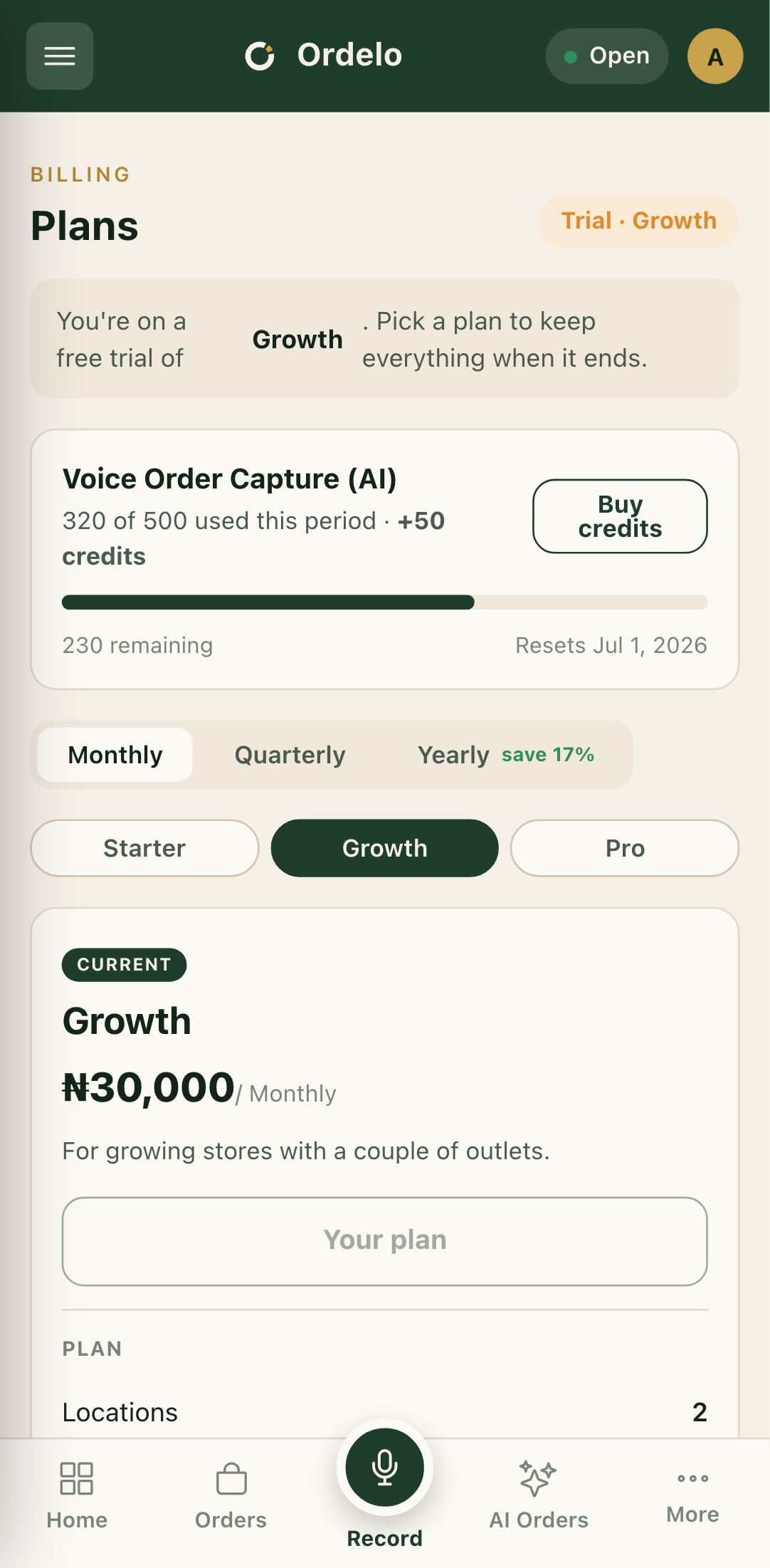 Plans
Plans
Subscribe or upgrade
- Pick the plan you want and the billing cycle (Monthly, Quarterly, or Yearly).
- Tap the button on that plan. It reads Choose for a new subscription, or Upgrade if you already have an active plan.
- If you're upgrading, a Review your change window appears first. It shows your current plan, the new plan, any credit for unused time on your current plan, and You pay now. Check the amount and the renewal date, then tap Pay [amount].
- The secure payment page opens. Finish paying there.
- You're returned to the Plans screen. When the payment is confirmed you'll hear a chime and see Your plan is now active, and the Current tag moves to your new plan.
Buy voice-order credits
If your plan includes voice capture, a usage meter shows how many voice orders you've used this period and when it resets.
- When your quota is running low or used up, tap Buy credits on the meter.
- In Buy voice credits, set how many credits you want. The price updates as you change the number.
- Tap Pay [amount] and finish on the payment page.
- Credits are added once the payment is confirmed. They don't expire and are only used after your monthly quota runs out.
Tips
- The yearly cycle is the cheapest per month. Switching the toggle to Yearly knocks about 17% off compared with paying monthly.
- Upgrades are prorated. When you upgrade mid-cycle, you get credit for the unused time on your current plan, so "You pay now" is usually less than the full price.
- Commission is only on orders Ordelo brings you. The commission figure in the table never applies to your own walk-in or direct customers.
- A new subscription skips the review window. The proration preview only appears for upgrades. A first-time subscribe goes straight to payment.
- Blocked on a feature? If you were sent here to unlock something, a note at the top names the feature. Pick a plan that includes it.